Case management software: CaseCore, the digital core of support work
CaseCore is the platform for organisations that support people, built by KERN-IT. Each person enters a support journey with a goal, moves forward step by step with one or more support staff, and leaves with an outcome. In between, appointments, workshops, actions and messages leave a trace in a timeline nobody can rewrite. You know where everyone stands, who must act, and what your work achieves.
It is one of our business platforms: complete software, designed, hosted and maintained by our team in Brussels, and fitted to your organisation rather than the other way round. Incubator, training centre, volunteer network, support service or matching programme: CaseCore switches on the modules that fit the way you support people.
CaseCore comes with an AI assistant: it prepares your appointments from the file, spots people who are drifting away, drafts a first review and answers your questions about your journeys. It prepares, the support worker decides.

Supporting people means following dozens of paths at once
Nobody knows where each person stands
Who is just starting, who is moving, who has been going round in circles for two months? The answer lives in the lead's head, and it goes on holiday with them.
The thread gets lost between tools
A spreadsheet for sign-ups, a calendar for appointments, an inbox for messages, a shared drive for documents. Piecing together one person's story takes a morning.
Missed appointments show up too late
One missed appointment, then a second, then nothing. By the time anyone notices, the person dropped out six weeks ago.
Nobody knows who must act
“I thought you had called her back.” An action without an owner or a due date stays pending, and the person being supported is the one who waits.
Several organisations, no shared view
The funder, the partner, the volunteer: each holds part of the file, and emails fly back and forth to find out where things stand.
The activity report is rebuilt by hand
How many people, how many exits, what outcomes? Every year-end, spreadsheets are recounted for what the tool should have given in one click.
One person, one journey, one timeline
The person
Their profile, documents, skills and consents. What you know about them, recorded once, however many journeys they go through with you.
The journey
What you do with them and why: a programme, steps, a plan with goals, a lead and other support staff, a start date, an exit and an outcome.
The timeline
Everything that happened, dated and signed: appointments attended or missed, steps completed, workshops attended, documents received, change of lead. Support staff add to it, nobody rewrites it.
Programmes, steps, profile fields, skill grids and possible outcomes are defined by your organisation. CaseCore follows your support method instead of imposing its own.
The whole journey, from first request to final review
Welcome
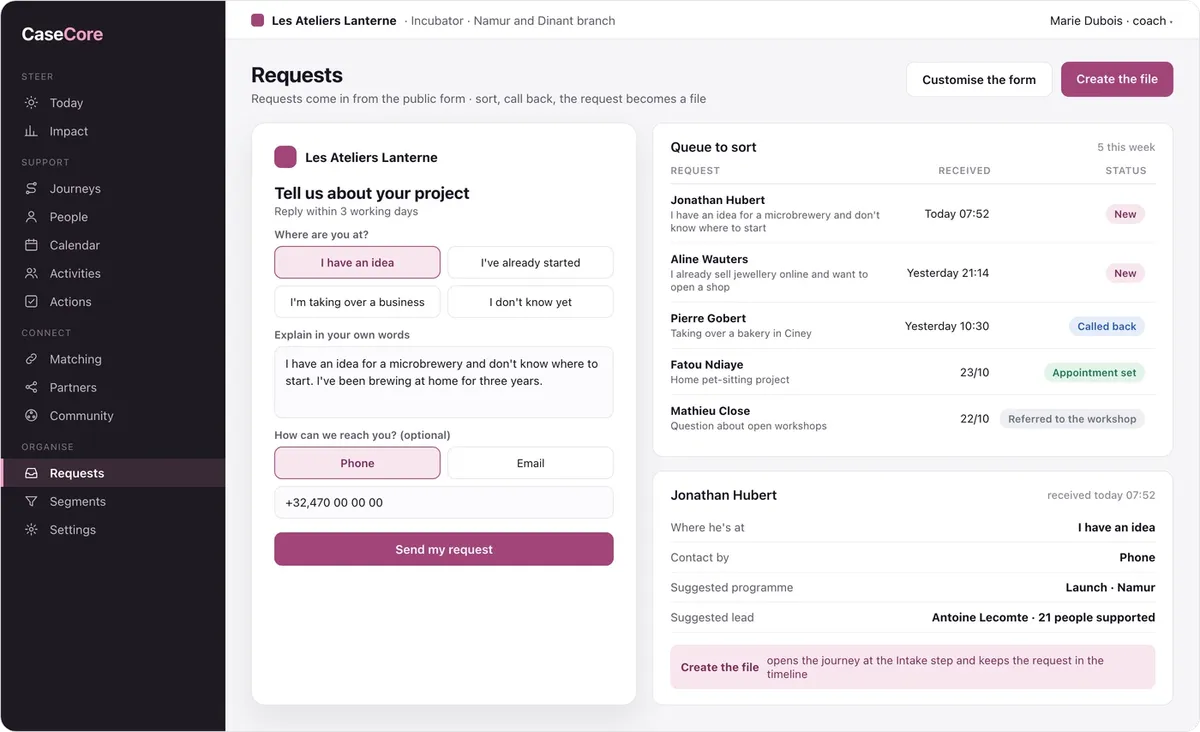
Public request form, queue to sort, file created in one click, journey opened in the right programme with a lead.
Support
Steps and support plan, appointments without overlaps and with automatic reminders, workshops and attendance, next actions with an owner and a due date.
Connect
Matching with volunteers or experts, peer circles between the people you support, a file shared with your partners.
Measure
Pace alerts, segments and bulk actions, outcomes at exit and follow-up at 6 and 12 months, activity report exported.
And everything that makes follow-up reliable
Access on a need-to-know basis
Each role sees what it needs, down to the field: reception sees contact details, the lead the file, management the figures.
A timeline nobody rewrites
Timeline entries are dated and signed. An administrator can still correct one, and the correction leaves a trace too.
SMS and email reminders
A reminder the day before the appointment, a bulk message to a segment, each one logged in the person's timeline.
Your calendar synced
Appointments land in each staff member's calendar; unavailability, closed days and public holidays show automatically.
Personal data under control
Consents recorded, full export or erasure of a person on request, access log, hosting in Europe.
In French and Dutch
The platform, messages and personal space in each person's language, plus English for those who need it.
Three modules, switched on to match how you support people
Matching
Pair the people you support with your volunteers or experts. You choose the criteria and their weight, CaseCore computes the best assignment for the whole batch, starting with the people hardest to match. A confirmed pair opens the journey with its supporter.
Community
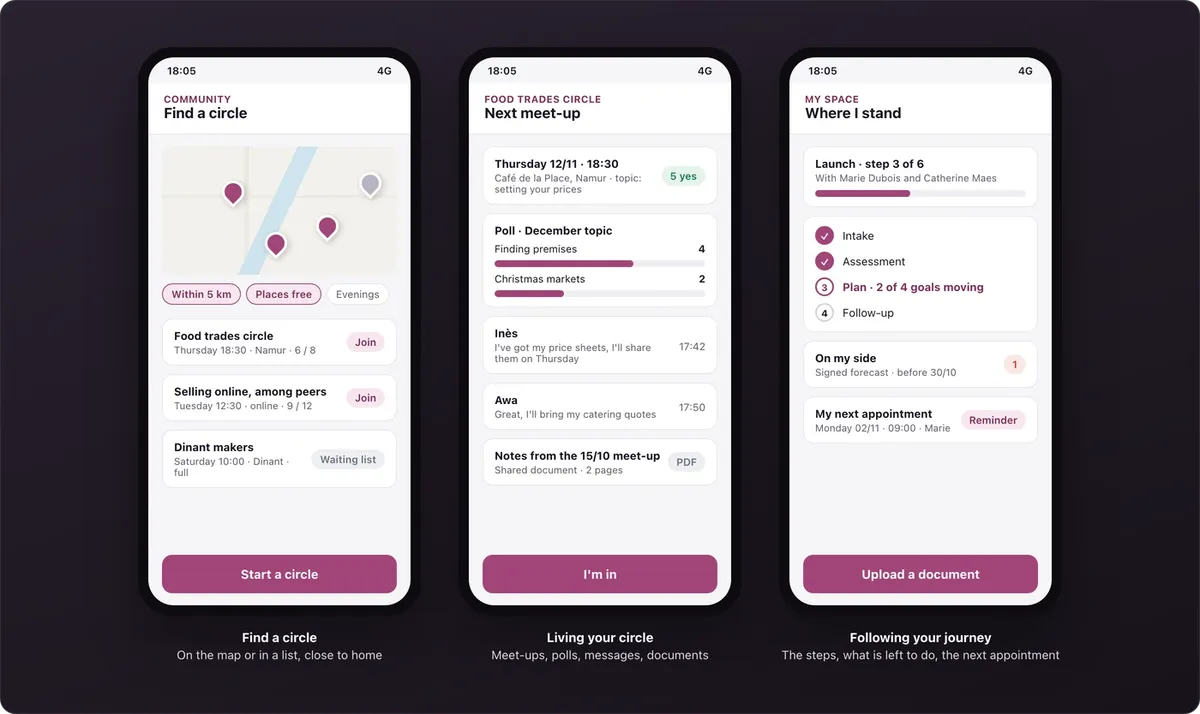
The people you support help each other: circles close to home, meet-ups, polls, messages and documents, on their phone. Your team facilitates, the community organises itself.
Partners
Several organisations around one file, each within its scope and with the person's consent. A shared timeline, messages in context, actions assigned to each organisation and an access log.
The core is always included: people, journeys, timeline, calendar, activities, actions, segments and impact. Modules are added when you need them, on the same data.
A look at the platform
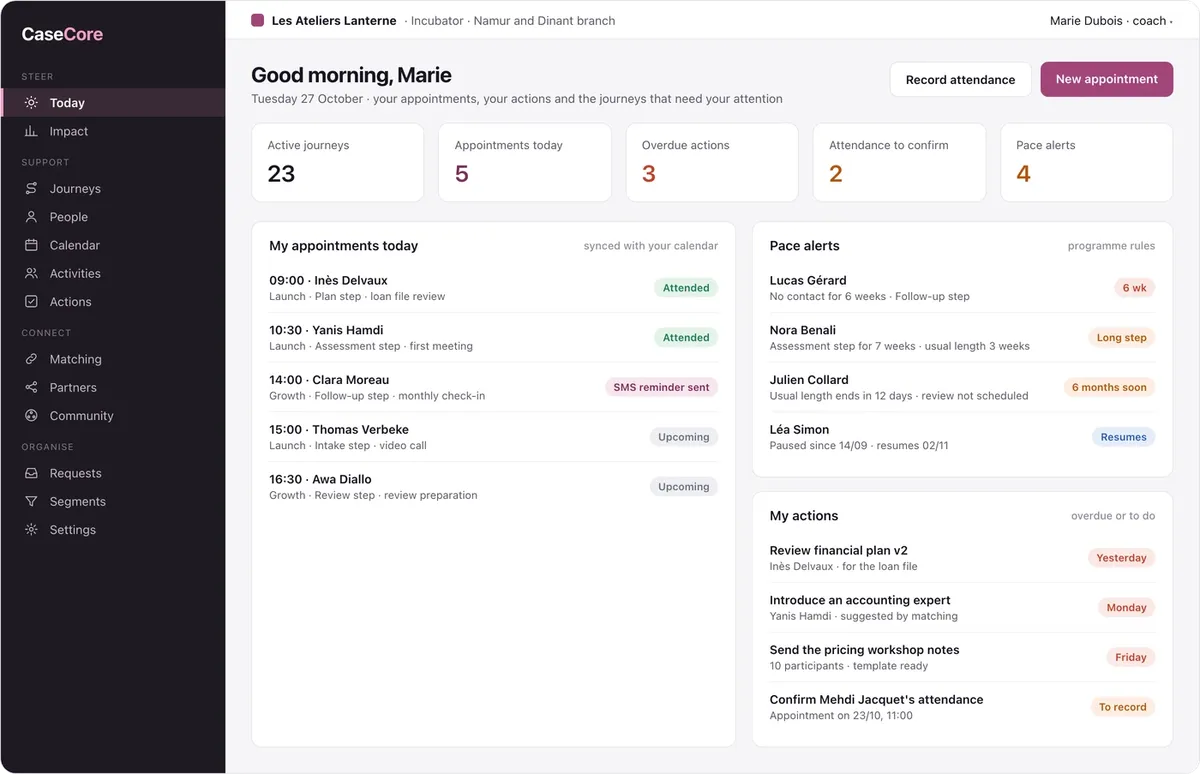
A week with CaseCore looks like this. On Tuesday morning, Marie sees her five appointments and four people with pace alerts. She moves the Plan step forward with Inès, who uploads her financial plan from her space. The funding partner flags what is missing before its committee; the action is assigned, the due date set. On Thursday, the matching session wraps up: each founder gets their volunteer expert. On Friday, the activity report downloads in one click. The screens show a fictitious incubator that supports project founders.
The support worker's day: their appointments, their actions and the people not to lose sight of.
- Today's appointments, attended or upcoming, SMS reminder sent
- Pace alerts: no contact for 6 weeks, a step dragging on, end of the usual length
- Overdue actions and attendance to confirm
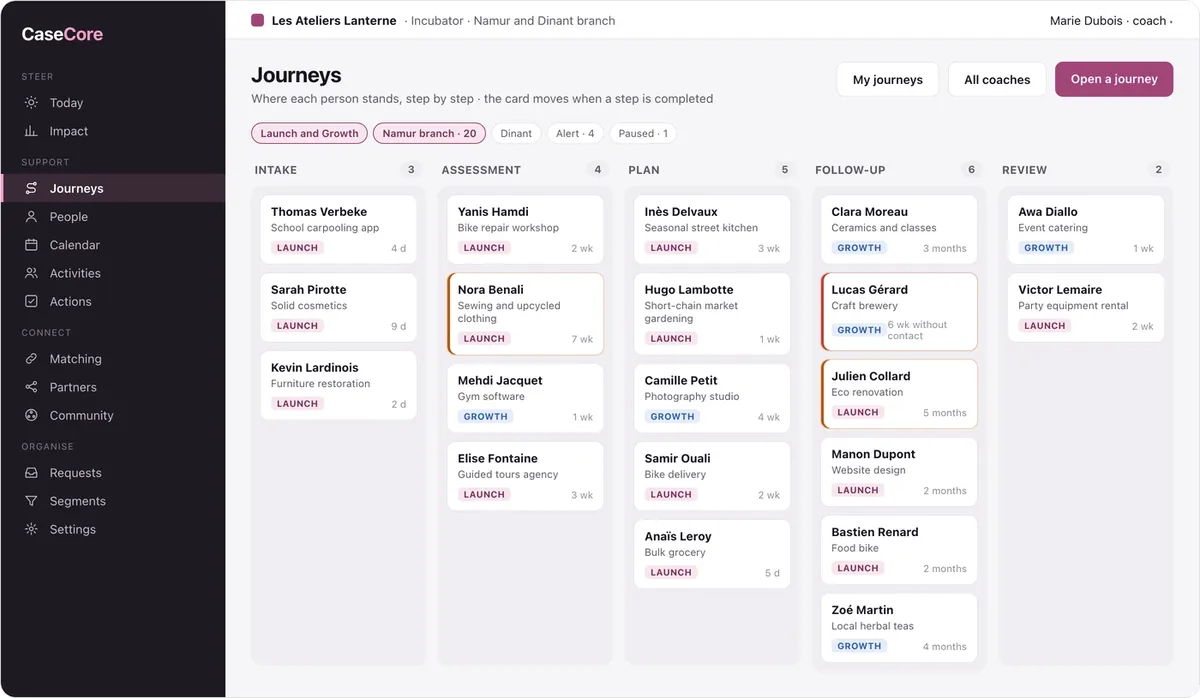
Journeys by step: where each person stands, at a glance.
- One column per programme step, one card per person
- Time spent in the step, alerts in colour
- Filters by programme, branch, staff member or situation
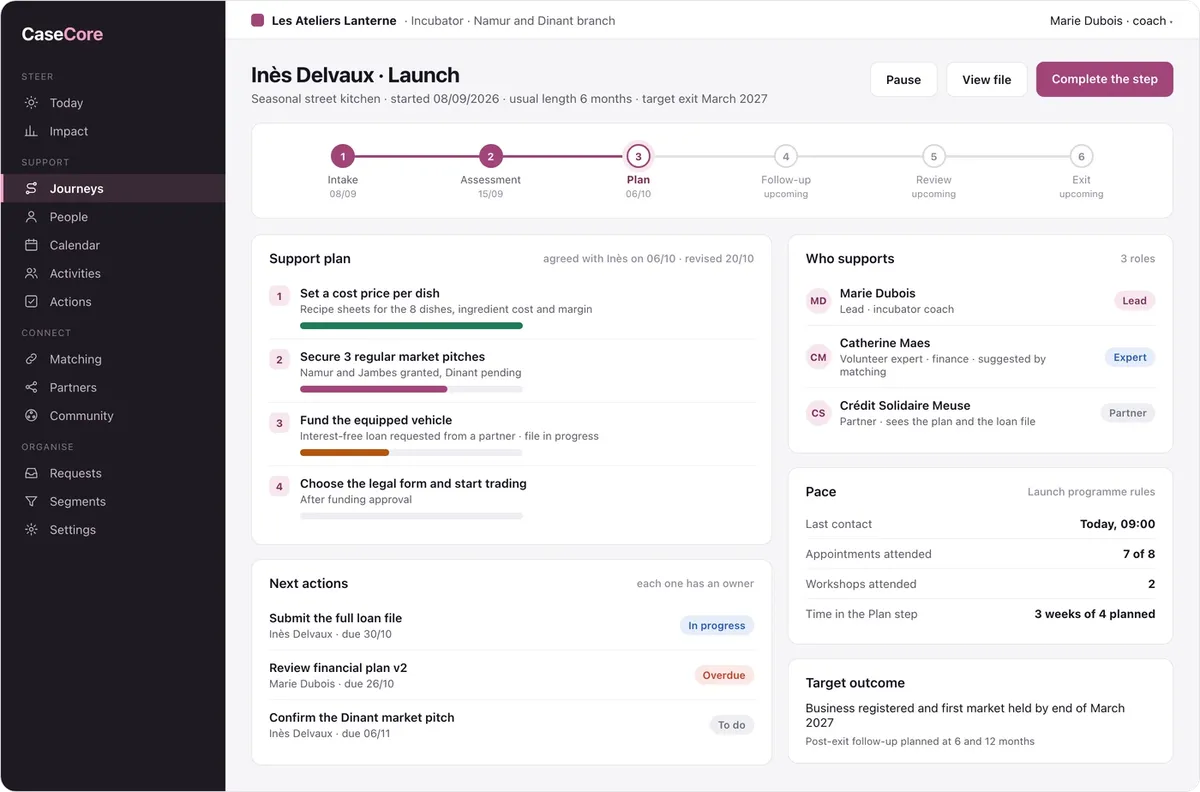
The journey record: the path, the plan and the people around it.
- Steps completed and dated, the current step
- The support plan: agreed goals and progress
- Who supports and in what role, the pace, the target outcome
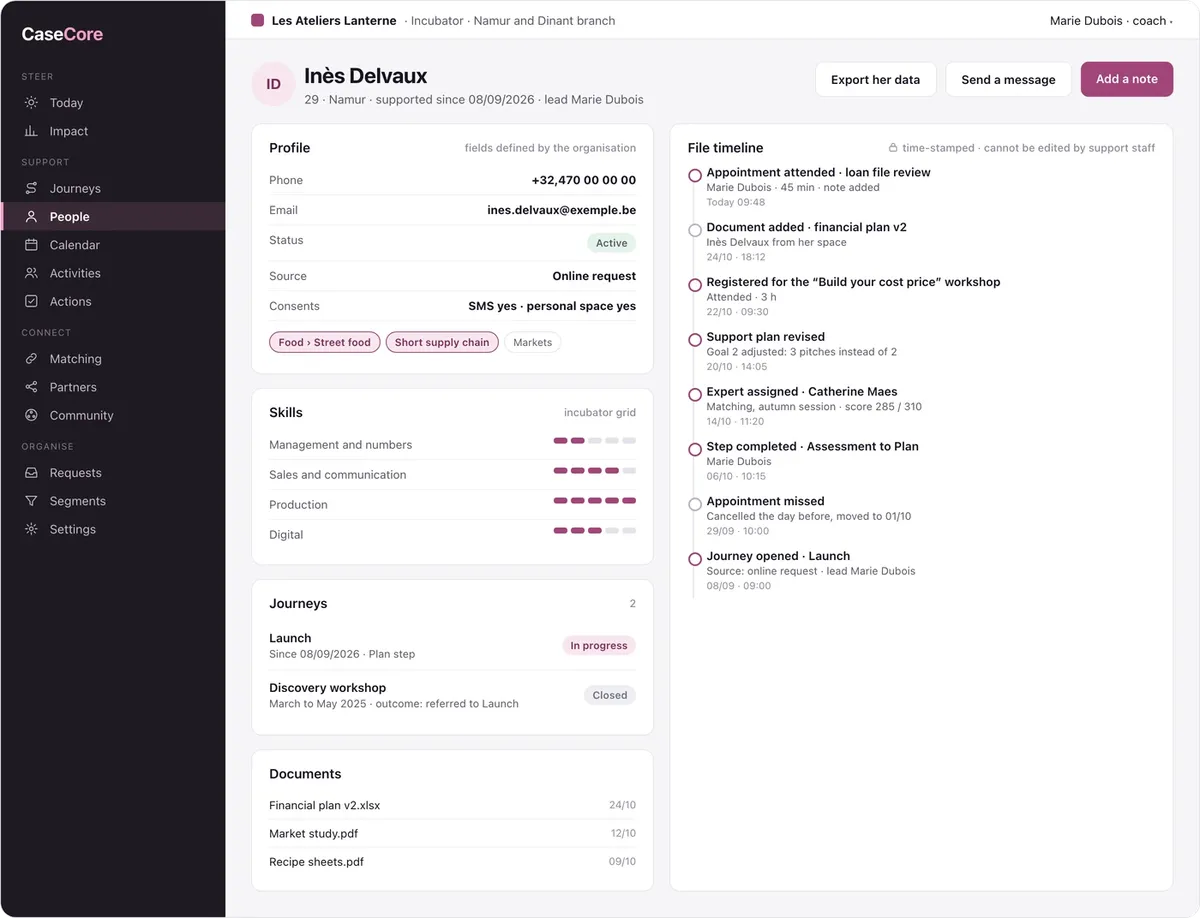
The file and its timeline: everything you know about a person, and everything that happened.
- Profile with fields defined by the organisation, keywords and skills
- Past and current journeys, documents
- Time-stamped timeline that support staff cannot edit
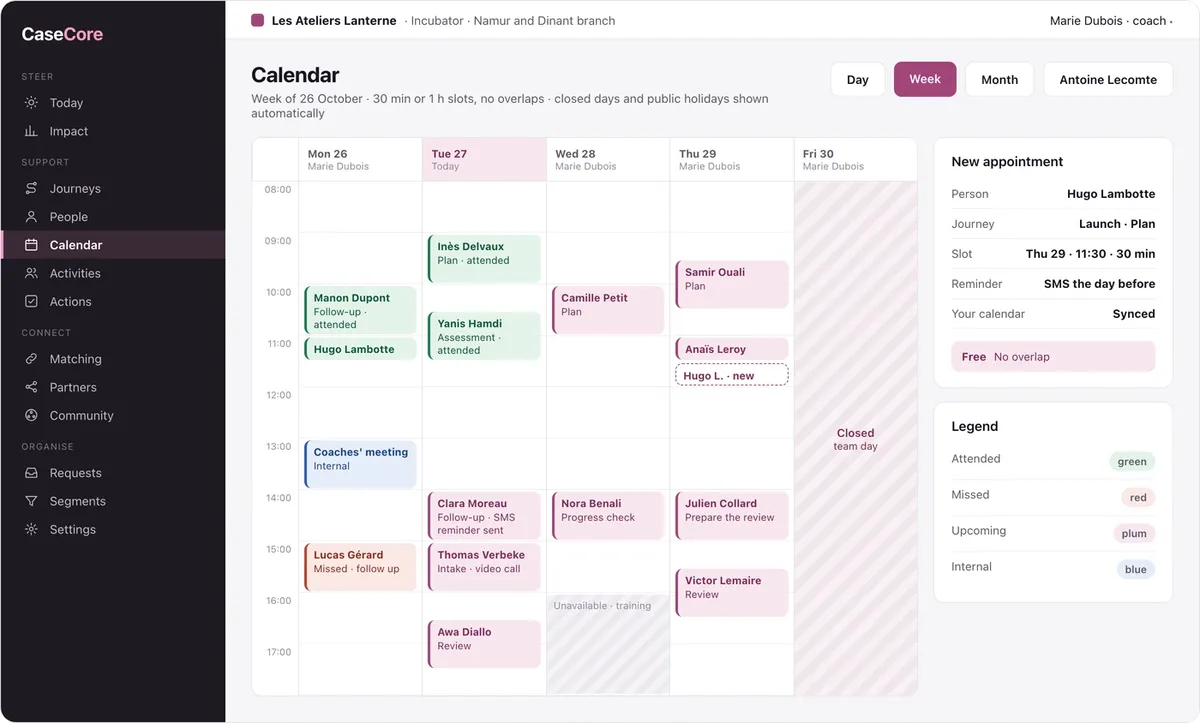
The calendar: appointments that never overlap and are never forgotten.
- Day, week and month views, each staff member's calendar
- Unavailability, closed days and public holidays shown automatically
- Attendance recorded afterwards, automatic reminder the day before
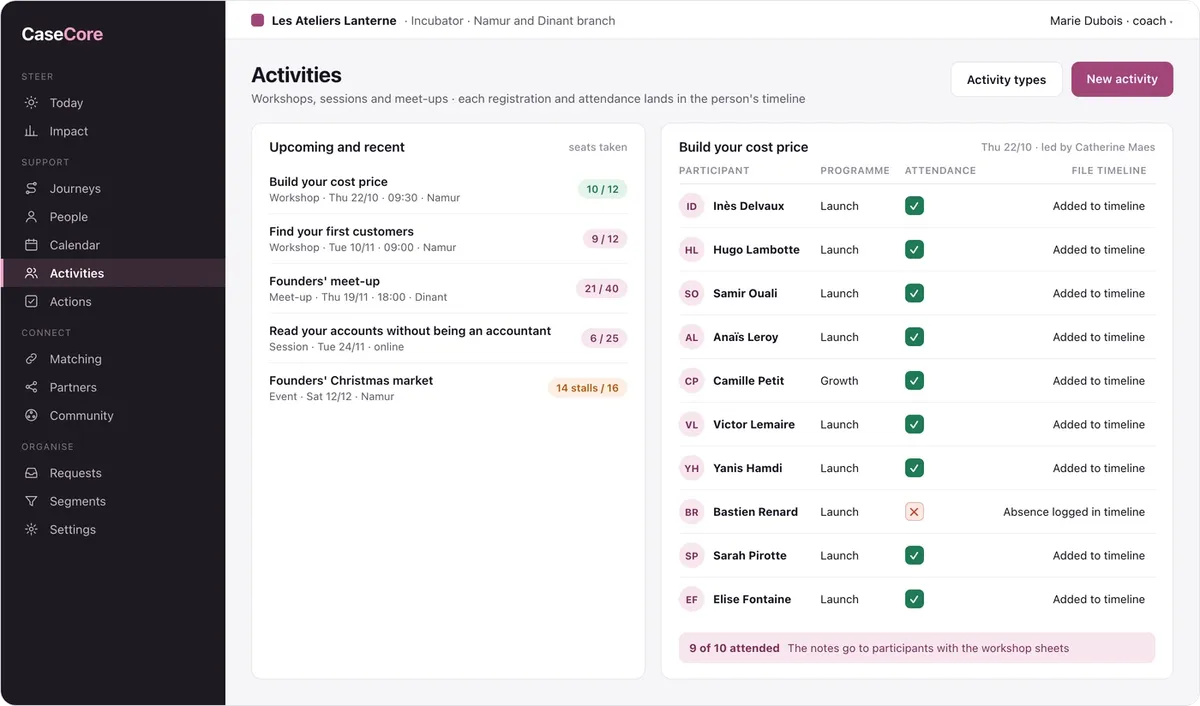
Group activities: workshops, sessions and meet-ups.
- Seats, registrations and attendance
- Each registration and absence lands in the person's timeline
- Notes sent to participants
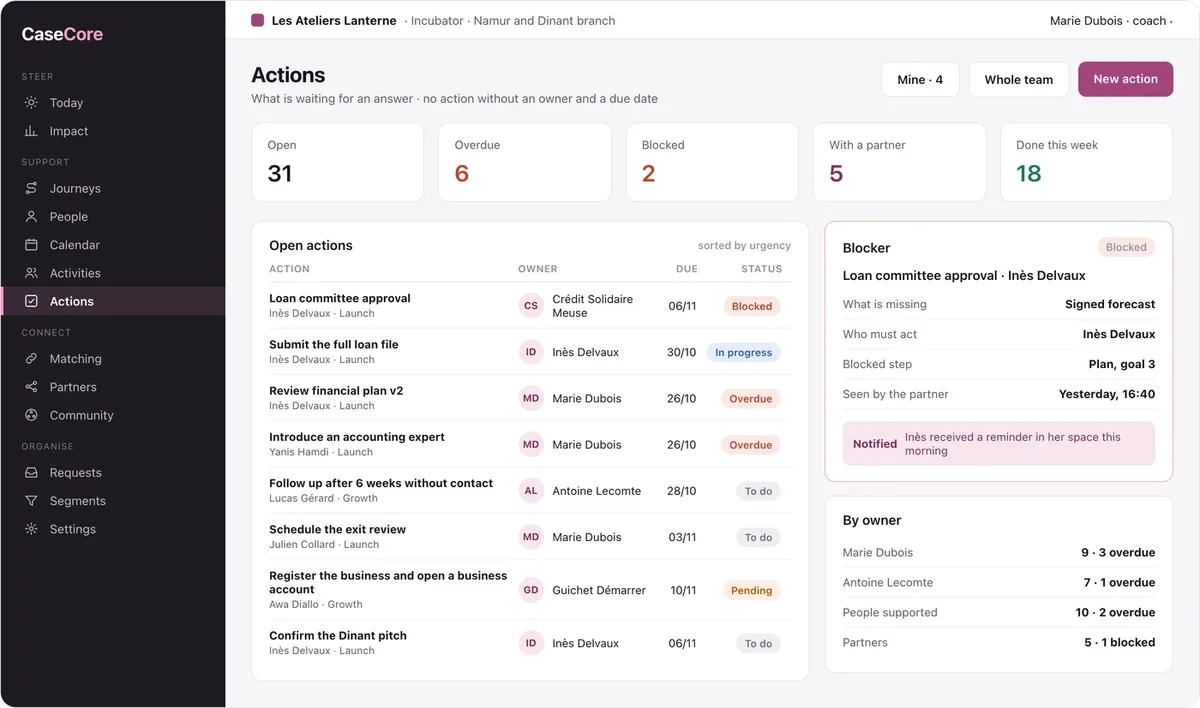
Actions: what is waiting for an answer, and from whom.
- No action without an owner and a due date
- A blocked action says what is missing and who must act
- The workload of each staff member, of the people supported and of partners
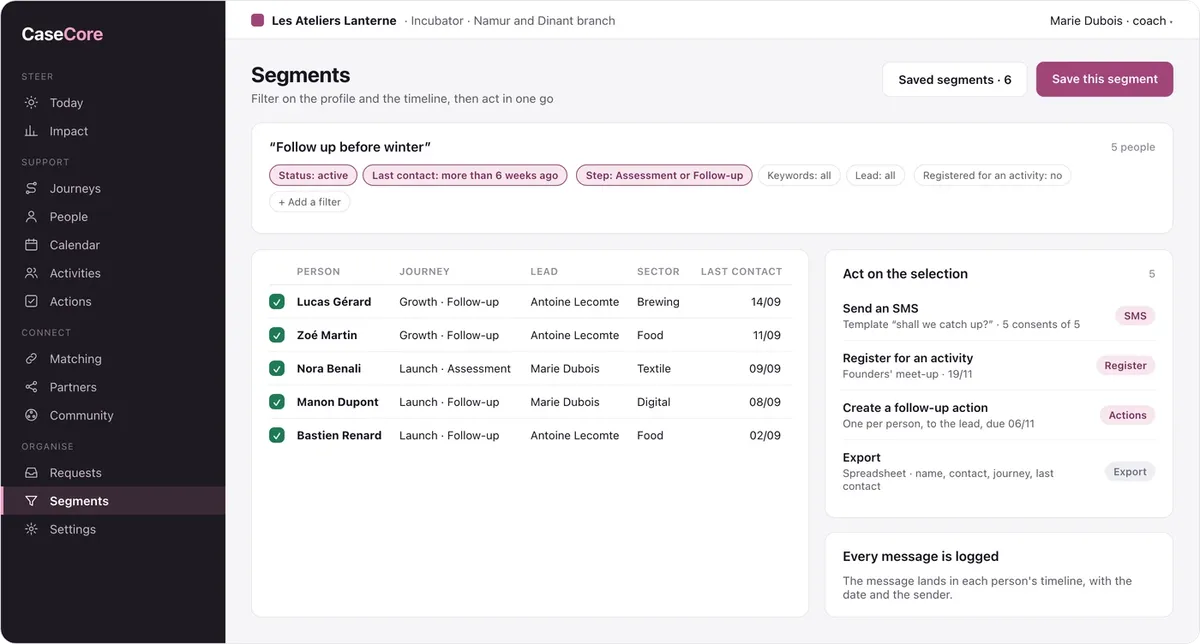
Segments: filter, then act in one go.
- Filters on the profile and the timeline: last contact, step, activity attended
- Bulk SMS, activity registration, follow-up actions, export
- Every message logged in the timeline
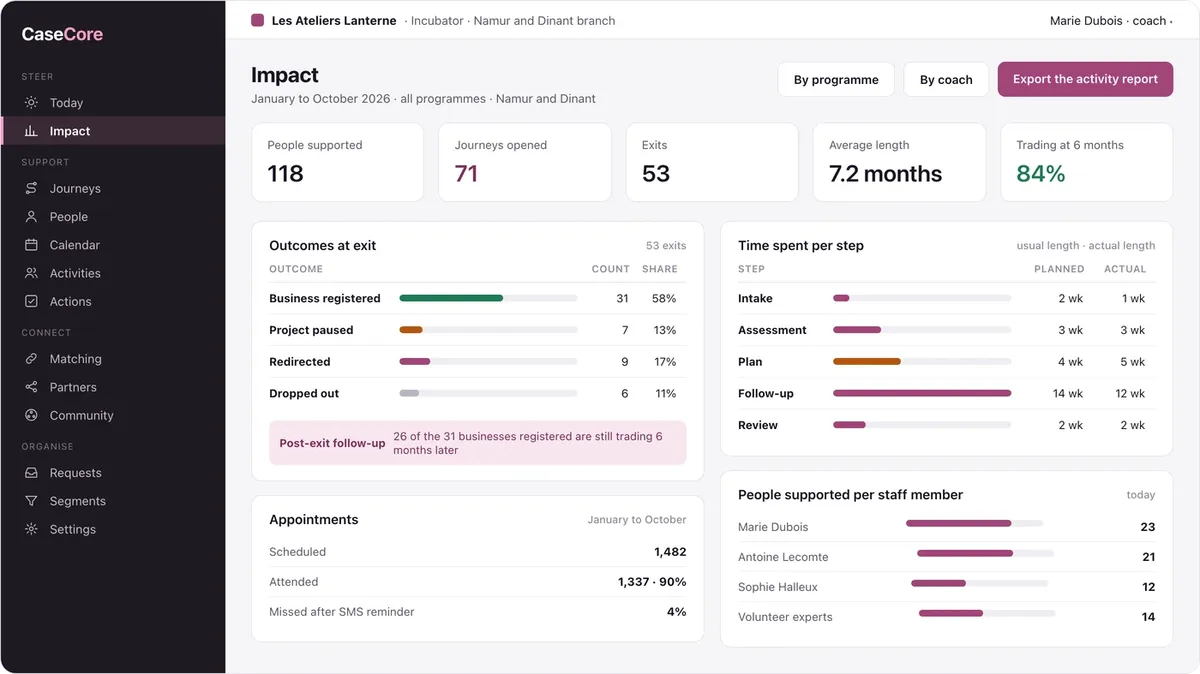
Impact: what your support work achieves.
- Entries, exits and average length
- Outcomes at exit and post-exit follow-up
- Time spent per step, appointments attended, workload per staff member
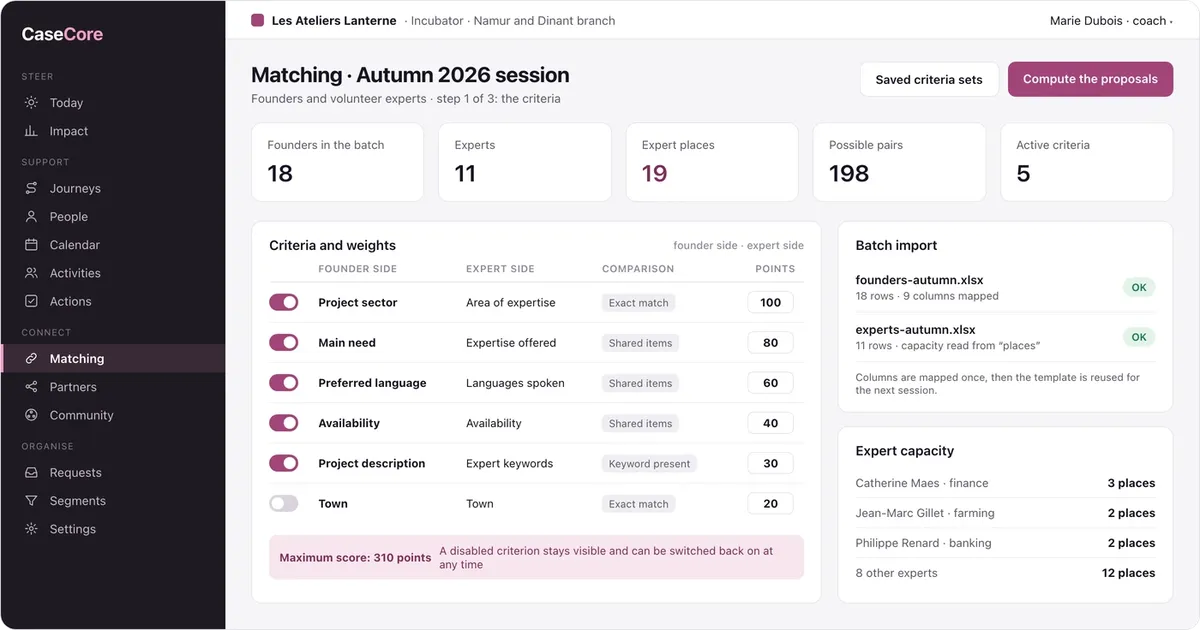
Matching, the criteria: you decide what counts.
- Import of the batch's two lists, columns mapped once
- Criteria, comparison mode and weight
- Capacity of each volunteer or expert
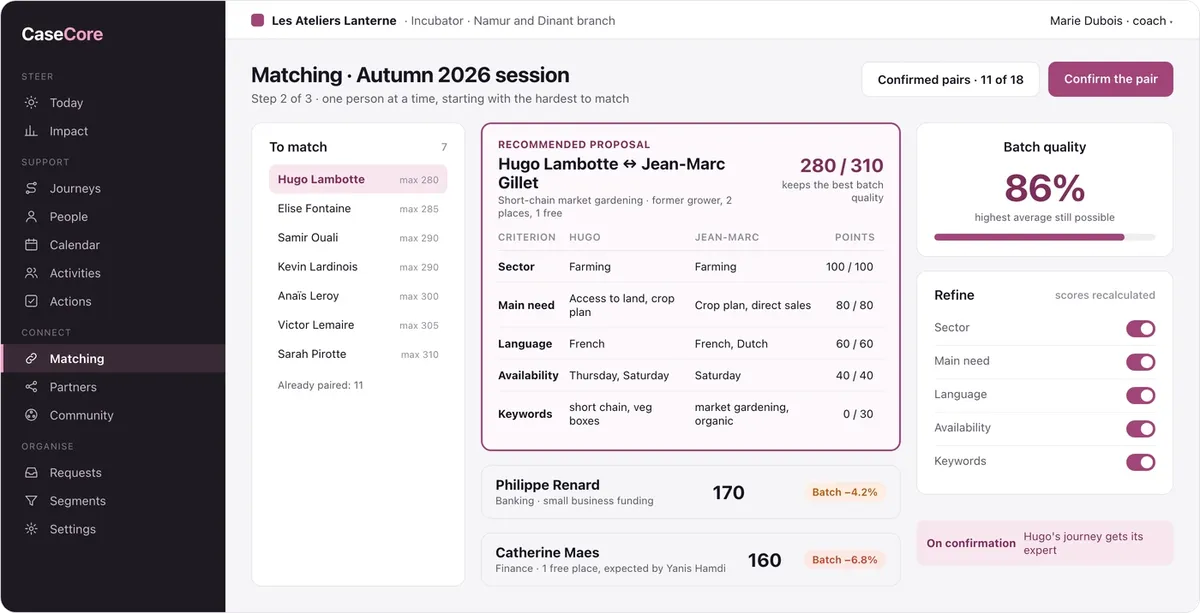
Matching, the proposal: the best pair for the person, and for the whole batch.
- The people hardest to match come first
- The recommended proposal, criterion by criterion
- Alternatives and their effect on batch quality
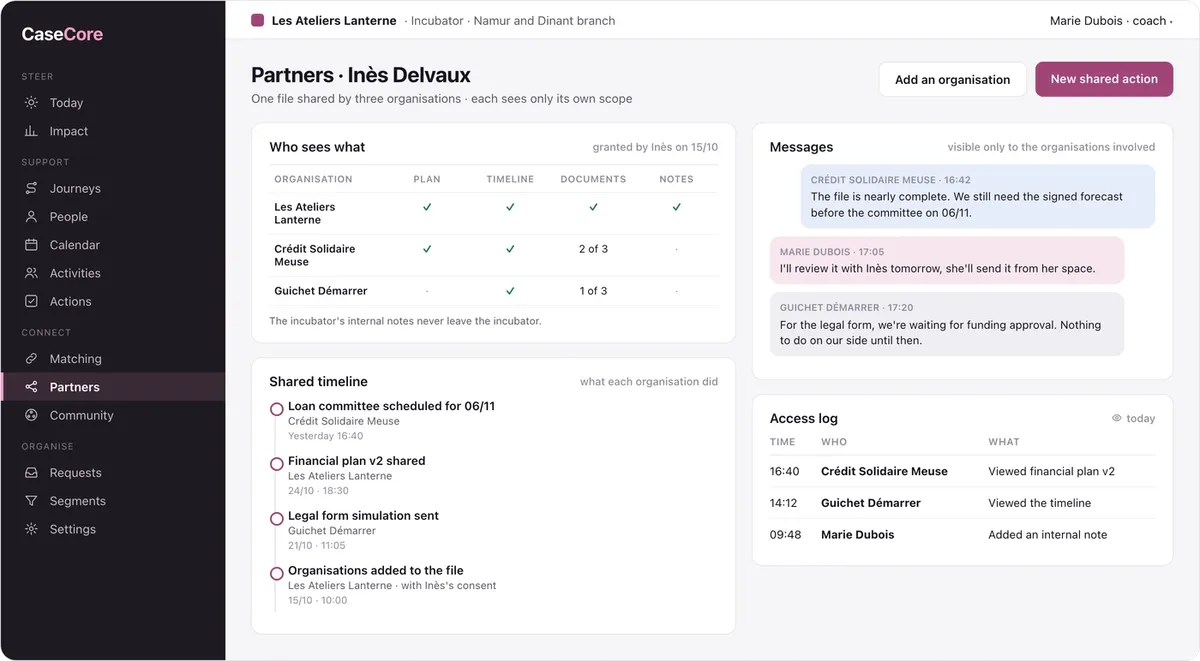
The shared file: several organisations, one view.
- Who sees what, granted by the person
- Shared timeline and messages in context
- Access log
Incoming requests: from online request to file.
- Public form in your colours
- Queue to sort, call back, referral
- File created and journey opened at the Intake step
In the pocket of the person being supported
The personal space and the community. The person sees where they stand, what is left to do on their side and their next appointment. They upload documents, find a peer circle close to home and find its meet-ups, polls and messages there.
AI prepares, the support worker decides
Time spent rereading a file or filling in a report is time taken away from people. CaseCore's assistant handles the preparation and leaves every decision to the support worker.
The AI assistant: ask a question, get an answer from your files.
- Prepares an appointment from the timeline and the plan
- Spots people at risk of dropping out
- Cites each source, you approve
- Read only, within your role's rights
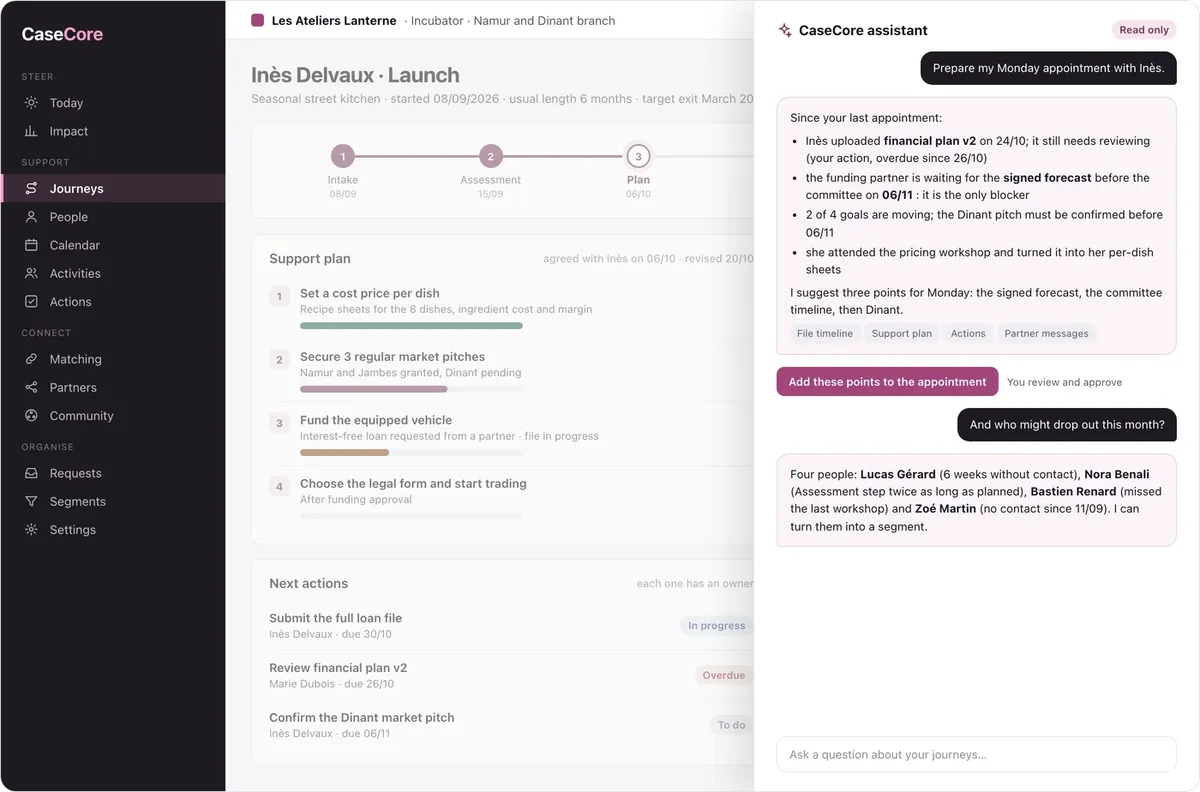
The appointment prepared
What happened since last time, the goals that are moving, what is blocking: three points suggested for the meeting.
Drop-outs spotted early
People without contact for too long, steps that drag on, repeated absences, gathered into a segment.
A first draft of the review
From the timeline and the plan, a draft exit review that the support worker rereads, corrects and signs.
Questions in plain language
“How many positive exits this quarter?”, “Who is waiting for an expert?”: the answer cites its sources.
Safeguards: the assistant works read only and cites each source. It sends no message and completes no step without approval. It respects each role's rights: it never shows what the support worker is not allowed to see. Your data stays hosted in Europe and is never used to train a model.
Spreadsheets, calendars and emails, or your digital core
Before
- A sign-up spreadsheet, one calendar per staff member, documents in a shared drive
- Everyone's progress in the lead's head
- Absences and drop-outs found too late
- The activity report recounted every year-end
After
- One platform, from request to final review
- Each person's step visible to the whole team
- Pace alerts before anyone drops out
- Impact measured as you go, exported in one click
What everyone gains
Management
Entries, exits, outcomes and team workload, ready for the board and the funders.
Support staff
Their day on one screen, the full file before each appointment, fewer manual follow-ups.
The people supported
Their path visible, reminders before appointments, a space to upload their documents and peers to move forward with.
Partners
Their part of the file, without email chains, and clear actions in their name.
Who is it for?
Incubators and accelerators
Founders followed step by step, volunteer experts, matching sessions, outcomes at exit.
Training and guidance centres
Individual paths, group workshops, attendance, follow-up appointments and reviews.
Volunteer networks and sponsorship programmes
Matching by criteria, pairs followed over time, a community between participants.
Support services
Files followed by a lead, several contributors, outside partners, protected personal data.
What you are comparing
Spreadsheets and office tools
Free and flexible, but with no dated timeline, no role-based access, no alerts and no report: the tool depends on everyone's discipline.
Sales CRMs
Built to sell, not to support: they track opportunities, not people moving through steps with several supporters.
Single-sector tracking software
Cut for one specific programme, they bend poorly to another method. CaseCore takes over their data and keeps your habits.
Designed and supported in Belgium by the KERN-IT team, hosted in Europe. Each access is limited to the right role, down to the field, and every time a file is opened it is logged. Partners only see what the person agreed to share. Personal data can be exported or erased on request: GDPR by design, guaranteed reversibility.
Support is local too: you talk to the people who build the platform, and your change requests feed the product roadmap directly.
Start without switching everything
A demo on your method
Bring your list of steps and an export of your sign-ups: we show them to you in CaseCore, with the timeline and the alerts.
A pilot programme
Start with one programme or branch, then open the others when the team is ready.
Your data migrated in two passes
A first migration for acceptance testing, a second at go-live, so you start with up-to-date data. You do not start from a blank page.
How does it work? Made-to-measure software
Fully custom software is expensive, and standard software forces the organisation to change the way it supports people. CaseCore sits in between: a complete base, fitted to your method.
1. A base already cut
Files, journeys, timeline, calendar, activities, actions, segments, impact, AI assistant: the core relies on building blocks already in production in our other platforms.
2. Fitted to your method
Your programmes, steps, fields, grids, roles, partners and message templates: from configuration to custom-built modules.
3. Paid monthly, all included
Hosting, backups, updates and support included, with no upfront investment. The monthly fee depends on the size of the organisation, the amount of custom work and the pace you want, and a purchase option can be written into the contract.
Getting started
1
1. Demo on your method
Your steps, your programmes, a few sample files.
2
2. Configuration
Programmes, steps, fields, roles, message templates, modules.
3
3. Data migration
One pass for acceptance testing, one pass at go-live.
4
4. Launch & support
Team training, test period, ongoing support.
Related articles
Frequently asked questions
Our business platforms are complete software products built and operated by KERN-IT, ready to use for a given sector. CaseCore for support work, StoreCore for retail, AsblCore for nonprofits. You get a mature product without funding its development, and it stays customisable because we master all of its code. All platforms are presented on this page.
Programmes, steps, profile fields, skill grids and possible outcomes are defined per organisation. If your method can be described in steps, CaseCore follows it.
KernAcademy is for selling and running courses and coaching. CaseCore follows people over time, with a lead, several contributors, a plan and outcomes to measure.
Yes. Each journey has a lead and can involve other staff, volunteers or partners, each with their own role and rights.
Yes, with the Partners module and the person's consent. Each organisation sees its own scope, records what it does in the shared timeline, and every access is logged.
You import the batch's two lists, choose the criteria and their weight, and CaseCore suggests the best assignment for the whole batch. You confirm pair by pair, seeing the effect of each choice on batch quality.
If you switch it on, yes: a personal space on their phone to follow their journey, upload documents, confirm appointments and join the community.
Yes. An automatic reminder the day before an appointment and bulk messages to a segment, in line with consents. Each message is logged in the timeline.
CaseCore runs as an all-inclusive monthly subscription with no upfront investment: like a lease, the monthly fee covers full use of the platform, and a purchase option can be added. It depends on the size of the organisation, the modules switched on and the amount of custom work. We present a costed proposal during the demo.
On servers in Europe, in line with the GDPR. Daily backups, encrypted exchanges, access log, export and erasure of a person's data on request.
See CaseCore on your method
Tell us how you support people: your steps, your staff, your partners. We show you the platform that connects them, from request to final review.