











Turn your Excel file into an application
For department heads whose work lives in a file that has to be maintained by hand
In your department, one file keeps the work going. It often lives in the cloud, shared with the team. But it talks to no other tool: what comes from the ERP, accounting or emails has to be copied into it by hand, and what it holds has to be carried over elsewhere. Keeping it up to date becomes a job in itself.
KERN-IT turns that file, whether it lives in Excel, Google Sheets or Airtable, into a web application: one source, everyone enters their own part, alerts go out on their own, history is kept. We start from your file as it is, because it already holds your business rules. You start with one department, or even a single task, and the platform then extends to the rest of the company. From €5,000 excl. VAT for a very simple file, €20,000 on average, depending on complexity and connectors.
Excel is the best tool to start with. Until the day…
It grows too big
Dozens of tabs, thousands of rows, a file that takes a minute to open and crashes at the worst moment.
It becomes unmanageable
Nested formulas, macros, hidden columns, colours that mean "chase this up". Nobody dares touch it anymore.
It depends on one person
They know which tab is current and which column not to change. When they are on leave, the department slows down. When they leave, their rules leave with them.
It stays isolated
Even shared in the cloud, it talks neither to the ERP, nor to accounting, nor to the CRM. For your other software, it does not exist.
Excel, Google Sheets or Airtable: same fight
When we say Excel, we mean any tool made of rows and columns: Microsoft Excel, Google Sheets, LibreOffice, but also Airtable, Notion or Smartsheet. These tools share one thing: they let your department structure its work without waiting for anyone. That is a strength.
Their limit comes when the file becomes the department's production tool: volumes explode, business rules get more complex, cost per user climbs, links to other software are missing. That is where a custom application takes over, without throwing away what you have built.
The real cost: keeping the file up to date
Data copied both ways
From other systems into the file (ERP exports, orders received by email, accounting figures), then from the file into other systems (invoicing, reporting, colleagues' tools). Every entry takes time and opens the door to an error.
A file that never warns you
A certificate expires, a contract reaches its term, stock drops below the threshold, a case has been waiting for ten days. The file knows, but it tells no one.
Decisions based on yesterday's data
The file is only up to date after the last copy. Between two updates, the figures are already a few days old. You are steering by the rear-view mirror.
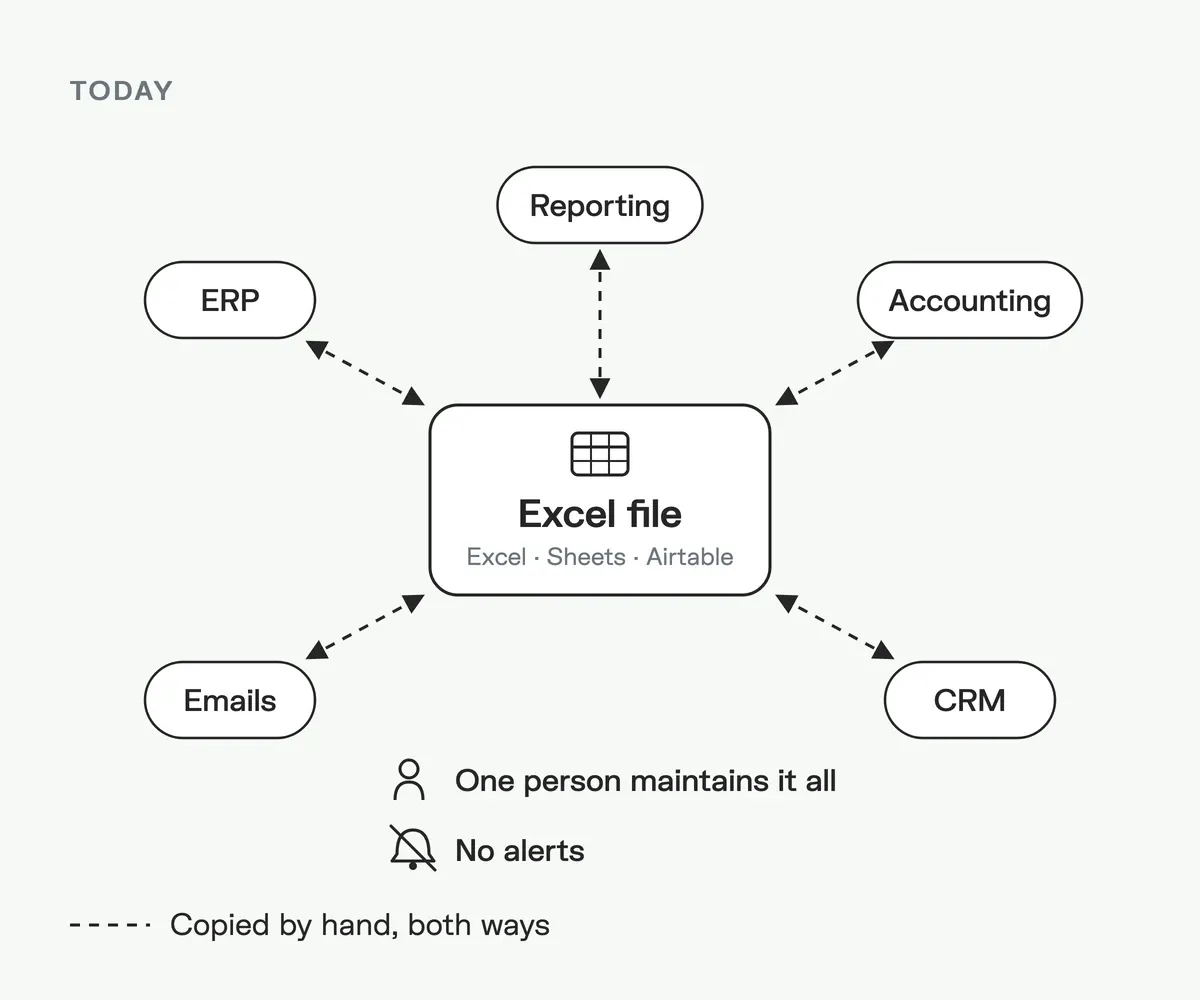
Today: an isolated file, maintained by hand
The file is at the centre of everything, but connected to nothing. Every arrow is a manual copy: what comes from the ERP, accounting or emails is carried into it, then its figures are carried over to invoicing and reporting.
Only one person knows how it all holds together.
With the application: everything is connected
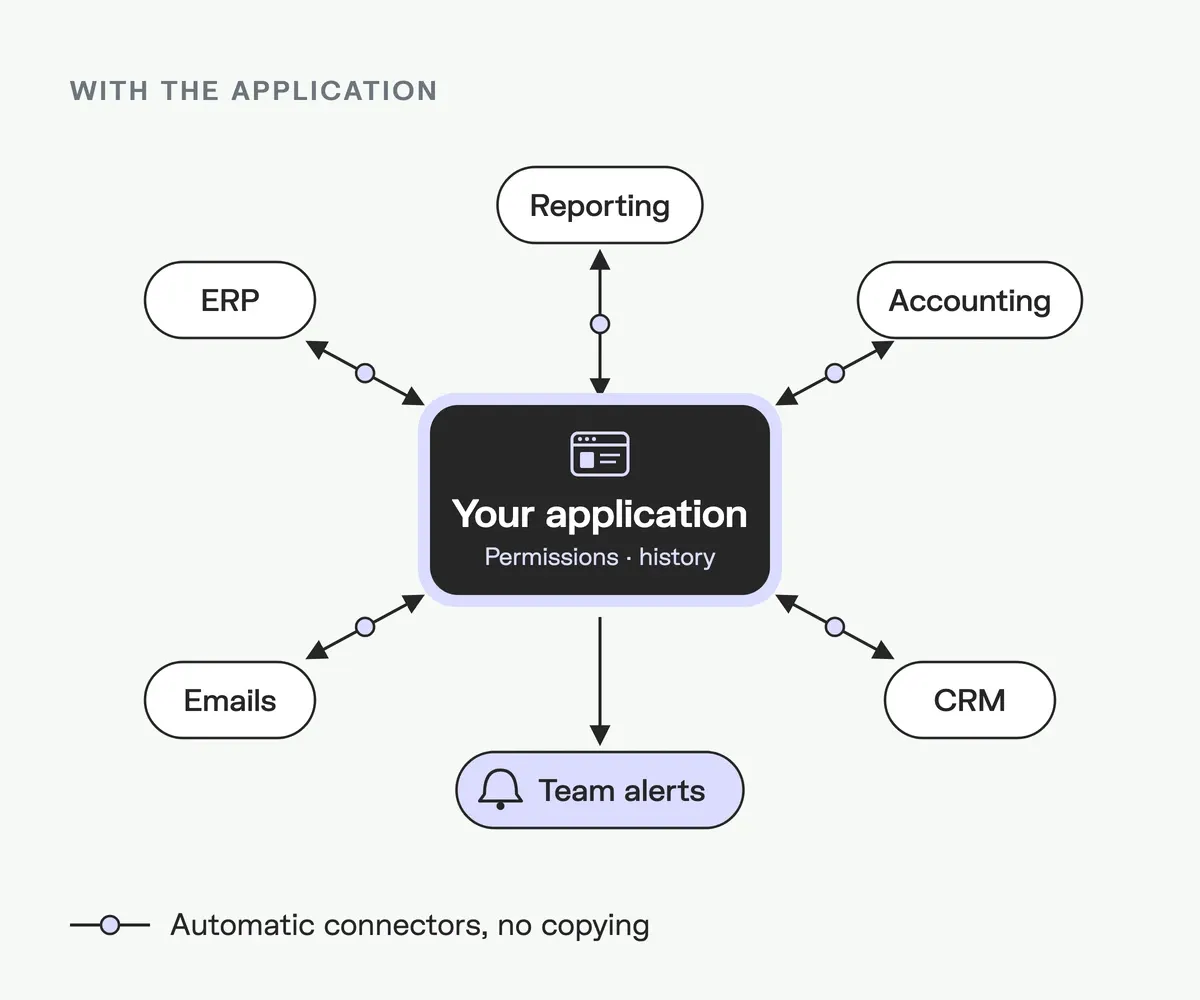
The application takes the file's place and carries your business rules. Every arrow becomes an automatic connector: data flows both ways, without copying, and as many connectors as needed can be added.
Alerts reach the right person at the right time, and every change is logged.
What your file becomes
Accessible anywhere
In the office, working from home or in the field, from a browser or a phone. Everyone works on the same up-to-date information.
Automatic alerts
Upcoming deadline, threshold crossed, missing field, pending case: the right person gets an email or a notification at the right time.
Permissions and history
Everyone sees and edits what concerns them. Every change is dated and signed: who changed what, and when.
Always exportable
Management wants its Excel table? It is generated in one click, up to date. The application then grows with your department, screen by screen.
Start with one department, extend to the whole company
One task, one department to start
HR certificate tracking, a workshop schedule, a unit's follow-ups: we start from the file that hurts most, on a controlled budget.
A scalable platform
Other departments are added next, module by module, on the same base: same users, same data, same alerts. Nothing is rebuilt, each step builds on the previous one.
As many connectors as you need
ERP, accounting, CRM, Microsoft 365, Google Workspace, e-commerce, banking, your suppliers' APIs: the platform connects to all your tools, with no limit on their number.
Which departments?
Human resources
Training, certificates, medical check-ups, onboarding, with a reminder before every expiry.
Quality and safety
Inspections, non-conformities, action plans, inspection deadlines and the related evidence.
Logistics and stock
Thresholds, supplier orders, inventories, movements between sites.
Facility
Contracts, interventions, suppliers, renewals and budgets per building.
Sales operations
Quote tracking, follow-ups, orders to prepare and invoice.
Small teams and non-profits
Volunteers, cases, grants and supporting documents, shared between several people.
First, we structure and clean your files
Most files we receive have grown in layers: duplicates, catch-all columns, dates stored as text, value lists that differ from one tab to another, several files saying almost the same thing. That is not a problem: it is our starting point.
With the person who owns the file, we structure your data (one row, one item; one column, one piece of information; shared value lists) and we clean it: deduplication, harmonised formats, missing data flagged. You get a clean file within the first weeks, and a sound base for the application.
From your file to the application, in 5 steps
1
1. Reading the file
We take apart tabs, formulas, macros and implicit rules with the person who owns it.
2
2. Structuring and cleaning
Your data is put in order, deduplicated and harmonised. Every piece of information has a single source.
3
3. Clickable mock-up
You approve the screens and alerts before a single line of code.
4
4. Development
Entry screens, permissions, alerts, exports, connectors. A demo at every step.
5
5. Data import and switchover
Your historical data is imported. The file stays read-only during the transition.
How much does it cost?
Turning a file into an application starts from €5,000 excl. VAT for a very simple file: one team, a few entry and consultation screens, permissions, history, email alerts, import of your data and Excel export. On average, a project of this kind comes to around €20,000 excl. VAT.
The price grows with complexity: number of files to merge, calculation rules and macros to reproduce, number of roles, and above all the connectors to your other tools (Odoo, accounting, Microsoft 365, Google Workspace, a supplier's API), with no limit on their number. You get a fixed price after we have read your file.
When several departments are involved, the application becomes the first module of a centralised platform: nothing is thrown away. All our ranges are published on the software development cost page.
Where is your application hosted?
At KERN-IT, by default. We host your application and take care of backups, security updates and monitoring. You have nothing to install or maintain.
On your servers, if needed. If your internal policy requires it, we install the application in your infrastructure. This option adds an infrastructure setup cost and monitoring licences, priced in the offer.
They trust us

Frequently asked questions
We start from the existing file: we analyse its tabs, formulas, macros and implicit rules, structure and clean the data, then build a web application that carries those rules with entry screens, access rights, alerts and history. The data is imported and the file stays available during the transition.
From €5,000 excl. VAT for a very simple file, and €20,000 excl. VAT on average. The price depends on complexity (files to merge, calculations, roles) and on the connectors to your other tools. You get a fixed price after we have read your file.
Yes, it is the approach we recommend. Our platforms are scalable: you start with one department or a single task, then other departments are added on the same base, with as many connectors as needed to your other tools.
Yes. Google Sheets, Airtable, Notion or Smartsheet are handled like Excel: we take over the structure, the data and the rules. For Google Sheets and Airtable, the import can even run directly through their API.
No, it is the most common case. We structure and clean your files before building anything: duplicates, formats, value lists, missing data. The mess even shows us where the exceptions of your business are.
The cloud (SharePoint, OneDrive, Google Drive) solves access and sharing, not maintenance: data still has to be copied by hand between the file and your other tools, in both directions, and the file triggers no alerts. It also stays fragile: one overwritten formula or forgotten filter, and the figures change without anyone noticing.
It is a good option for a simple, stable need. When business rules get more complex, connectors multiply or the cost per user climbs, a custom application becomes sturdier and often cheaper over time. We tell you honestly which one fits.
By default at KERN-IT, with backups, updates and monitoring. If needed, we install it on your servers: this option adds an infrastructure setup cost and monitoring licences.
Yes. During the transition, the file stays available read-only. Afterwards, the application exports your data to Excel at any time, for those who want it.
Let's talk about your file
Excel, Google Sheets or Airtable, even messy: you show it to us during the call. In 30 minutes, we tell you what it would become as an application, with a first estimate. The fixed price follows once we have read the file.