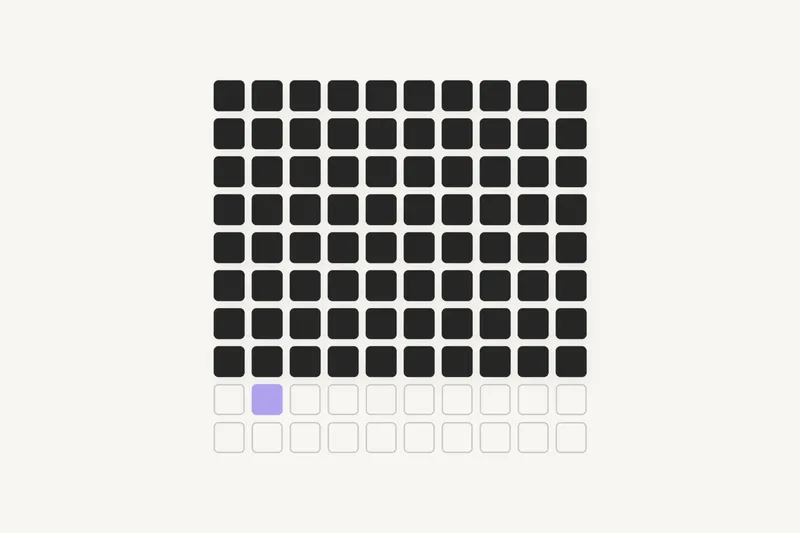
In software development, the Pareto principle shows up in almost every project: 80% of an application gets built with 20% of the effort, and the remaining 20% (edge cases, errors, access rights, real data) consumes most of the time and budget. That second phase, invisible in demos, is where most projects go off track.
Developers have a name for this phenomenon, it can be drawn on a chart, and above all it can be anticipated. This article explains why the last mile costs so much, lists as exhaustively as possible the details it is made of, and shows how to plan for it from day one.
What is the Pareto principle?
In 1896, the Italian economist Vilfredo Pareto observed that about 80% of the land in Italy belonged to 20% of the population. In the 1940s, quality expert Joseph Juran generalised the idea: in many systems, a small share of causes produces most of the effects. This became known as the 80/20 rule, covered in detail in our Pareto principle definition.
Software follows the same pattern. In October 2002, Steve Ballmer, then CEO of Microsoft, wrote in an internal memo that error reports from Windows and Office showed that about 20% of bugs caused 80% of all errors, and that 1% of bugs caused half of them. The exact figure varies from one project to another, the shape of the curve much less so.
The ninety-ninety rule: the developer's version
Developers know a more ironic variant, attributed to Tom Cargill (Bell Labs) and popularised by Jon Bentley in his Programming Pearls column of September 1985:
"The first 90 percent of the code accounts for the first 90 percent of the development time. The remaining 10 percent of the code accounts for the other 90 percent of the development time."
The total is 180%, on purpose. The joke describes what teams actually go through: for weeks, the project moves at the planned pace, then it stays "almost done" for much longer than expected.
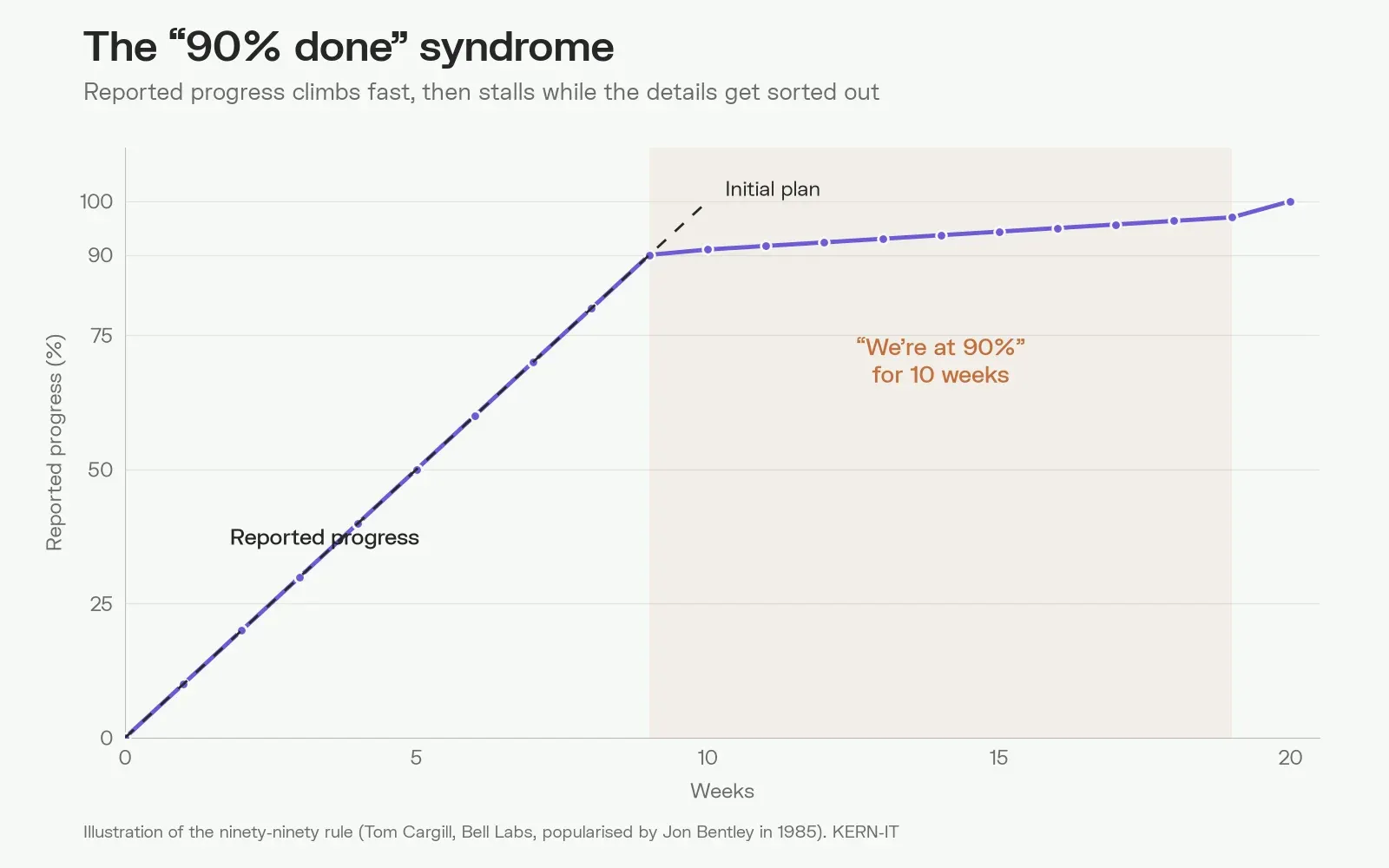
On this chart, reported progress follows the plan faithfully up to 90%. After that, each week adds only a point or two. Nobody is lying: the remaining work is simply of a different nature.
Why the first 80% goes so fast
At the start of a project, the team builds the happy path: the user logs in, fills in a valid form, submits it, and everything goes well. That path is short and predictable, and modern tools speed it up enormously. A framework such as Django provides authentication, an admin interface and forms within hours. AI coding assistants produce a working screen in minutes.
The result: after a few weeks, the demo is convincing. The screens are there, the buttons respond, the client sees their software taking shape. This is exactly what happens with vibe coding and no-code: building a prototype has never been faster, yet the rest of the road has not become any shorter.
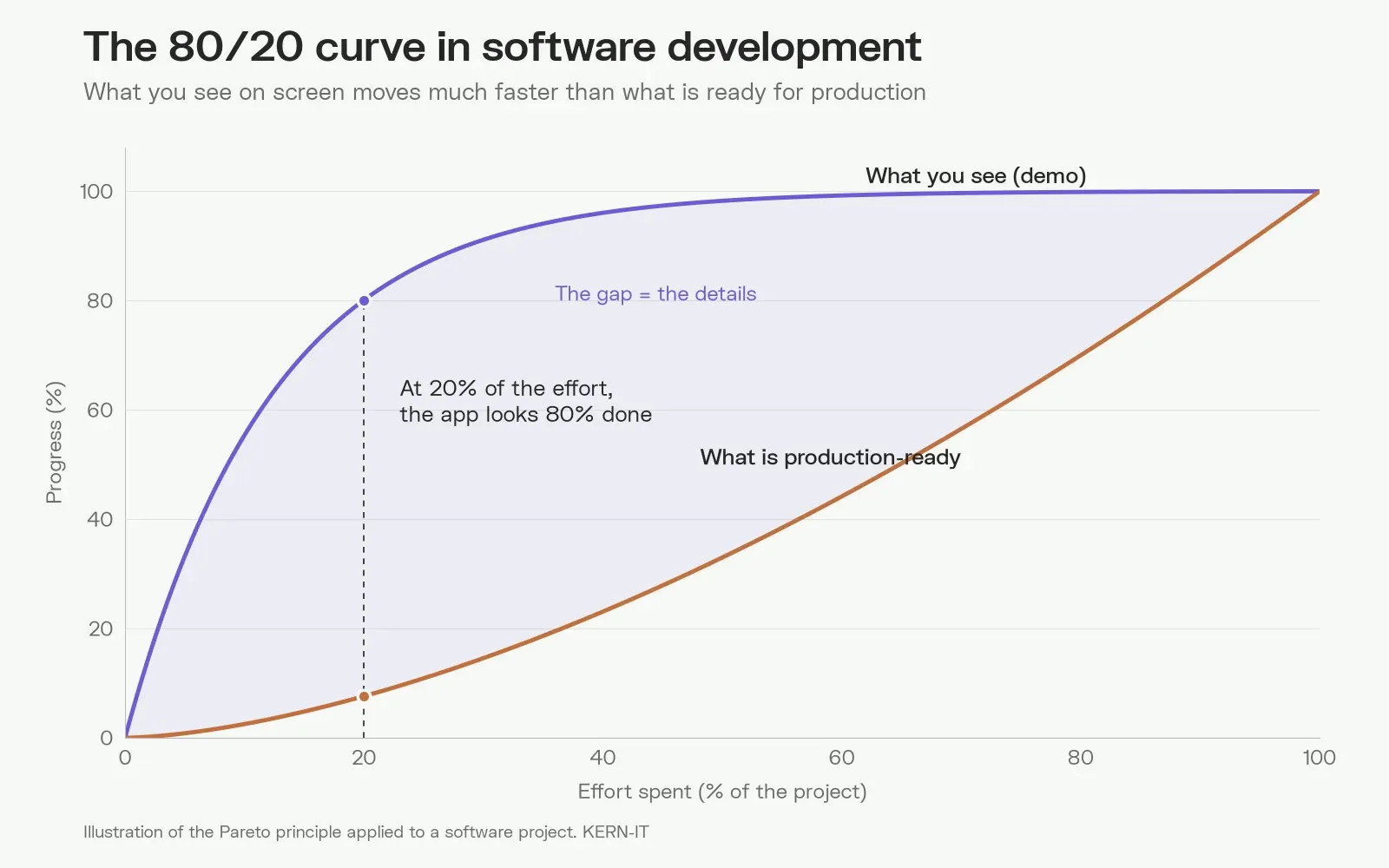
These two curves sum up the problem. The violet curve, the one everyone watches, rises very quickly. The orange curve, the one that matters on go-live day, progresses slowly and steadily. The area between them is the details.
Why everything slows down afterwards: the complexity of details
Taken on its own, a detail is almost always simple. Handling an empty field, writing an error message, preventing a double click: a few lines of code. The problem comes from their number and above all from their interactions.
Take a booking application with only ten yes-or-no business rules: business or private customer, online payment or invoice, booking editable or not, and so on. Ten independent rules give 210, or 1,024 possible combinations. A single badly designed one (a business customer cancelling an invoiced booking after the deadline) is enough to produce a wrong invoice, a forgotten refund or inconsistent stock.
Details do not add up, they multiply. That is why the end of a project looks nothing like its beginning: the team no longer builds screens, it handles intersecting cases. And each fix can break another one, which calls for tests, and therefore more time.
The direct consequence: effort does not grow in a straight line. It stays almost flat at first, then becomes near-exponential as you approach 100%. Each new slice of progress costs more than the previous one, because it deals with rarer, more intertwined cases that are harder to test.
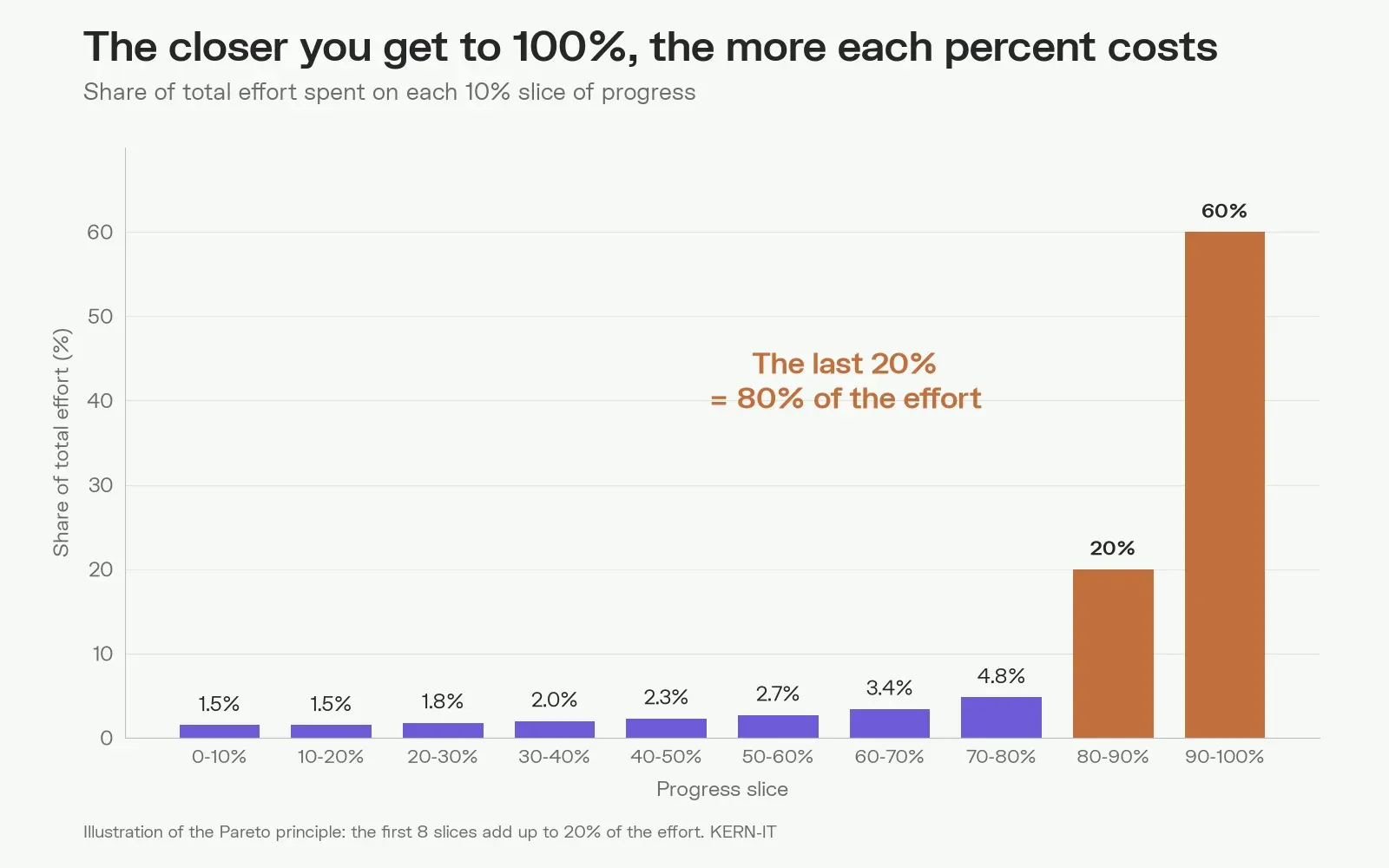
In this model, going from 90% to 100% alone takes more effort than the rest of the project combined. And 100% remains a horizon: there is always one more case, one more browser, one more business exception. A successful project does not aim for absolute zero defects, it consciously sets the expected level of finish for each part of the software.
A second factor makes things worse: the shortcuts taken during the fast phase. Code written for the demo, without a structure designed to last, builds up technical debt. When the details arrive, every addition costs more, because what already exists must first be understood and consolidated.
The list of details that make up 80% of the effort
These details almost never appear in a first estimate. We group them by family below. No project meets all of them, but each one has already derailed a schedule somewhere.
Data and input
- Validation of every field: required, length, format, allowed values
- Local formats: VAT numbers, IBAN, international phone numbers, postcodes, European or American dates
- Accents, apostrophes, emojis and special characters in names and addresses
- Duplicates: two records for the same customer, two accounts for the same email address
- Excel imports with badly filled columns, merged cells or dates stored as text
- Data taken over from the old system, often incomplete or contradictory (data migration is a project in itself)
- Real volumes: a list that displays well with 20 rows becomes unusable with 50,000
- History and traceability: who changed what, when, and can it be undone?
Users, roles and permissions
- Roles and permissions: who can view, create, edit, approve, delete
- Data-level permissions: a sales rep only sees their own customers, a manager only their branch
- Invitations, activation, forgotten passwords, expired links
- Two-factor authentication, sign-in with the company's Microsoft or Google account
- An employee leaves: what happens to their files, tasks and history?
- Several companies or entities in the same tool, with different rules
Business edge cases
- Cancellations, partial refunds, credit notes
- Editing a document that has already been approved, sent or paid
- VAT rounding, multiple rates, cascading discounts, currencies
- Public holidays, time zones, daylight saving time, leap years
- Commercial exceptions: "except for this customer", "except this month", "unless the director approves"
- Intermediate states: draft, pending, partially delivered, disputed, archived
Errors and outages
- Double click on "Pay" or "Send"
- Connection lost in the middle of a long form
- External service unavailable: payment, email delivery, accounting software
- Payment declined, expired or charged back by the bank
- Emails that never arrive, or land in spam
- Error messages that users understand, with enough detail for the technical team
Simultaneous access
- Two people edit the same record at the same time
- The last item in stock sold twice
- An automated job running while a user edits the same data
Interface and user experience
- Empty states (no results), loading, pagination, sorting and filters
- Mobile and tablet versions, different browsers
- Long texts that break the layout, 60-character names
- Translations in French, Dutch and English, including emails and PDF documents
- Accessibility: keyboard navigation, contrast, screen readers
- Shortcuts power users expect: quick search, bulk actions, export
Connections to other tools
- Two-way sync with the ERP, CRM or accounting software
- Peppol e-invoicing, mandatory between businesses in Belgium since 1 January 2026
- Limits imposed by providers: call limits, quotas, version changes
- What to do when a sync fails halfway?
Documents and notifications
- On-brand PDF invoices, quotes and reports, with legal notices
- Automatic emails: content, frequency, unsubscribe
- Attachments: maximum size, accepted formats, storage
Security and compliance
- GDPR: consent, export and deletion of personal data
- Audit log of sensitive actions
- Protection against common vulnerabilities (injections, unauthorised access)
- Backups, and above all restore tests
Day-to-day operations
- Monitoring, alerts and logs to understand an issue reported by a customer
- Performance under real load
- A separate test environment with realistic test data
- Updates without downtime
- Admin screens so the business team can adjust its own settings
- Exports, reports and dashboards requested after go-live
Quality
- Automated tests on critical business rules
- Acceptance testing with real users and real data
- Documentation for users and for maintenance
Why software projects fail
The figures on IT project failures are old and consistent. A McKinsey and University of Oxford study of more than 5,400 IT projects (2012) found that a large project runs on average 45% over budget and 7% over time, while delivering 56% less value than expected. The Standish Group's CHAOS 2020 report classifies 31% of projects as successful, 50% as challenged (over budget, late or incomplete) and 19% as cancelled.
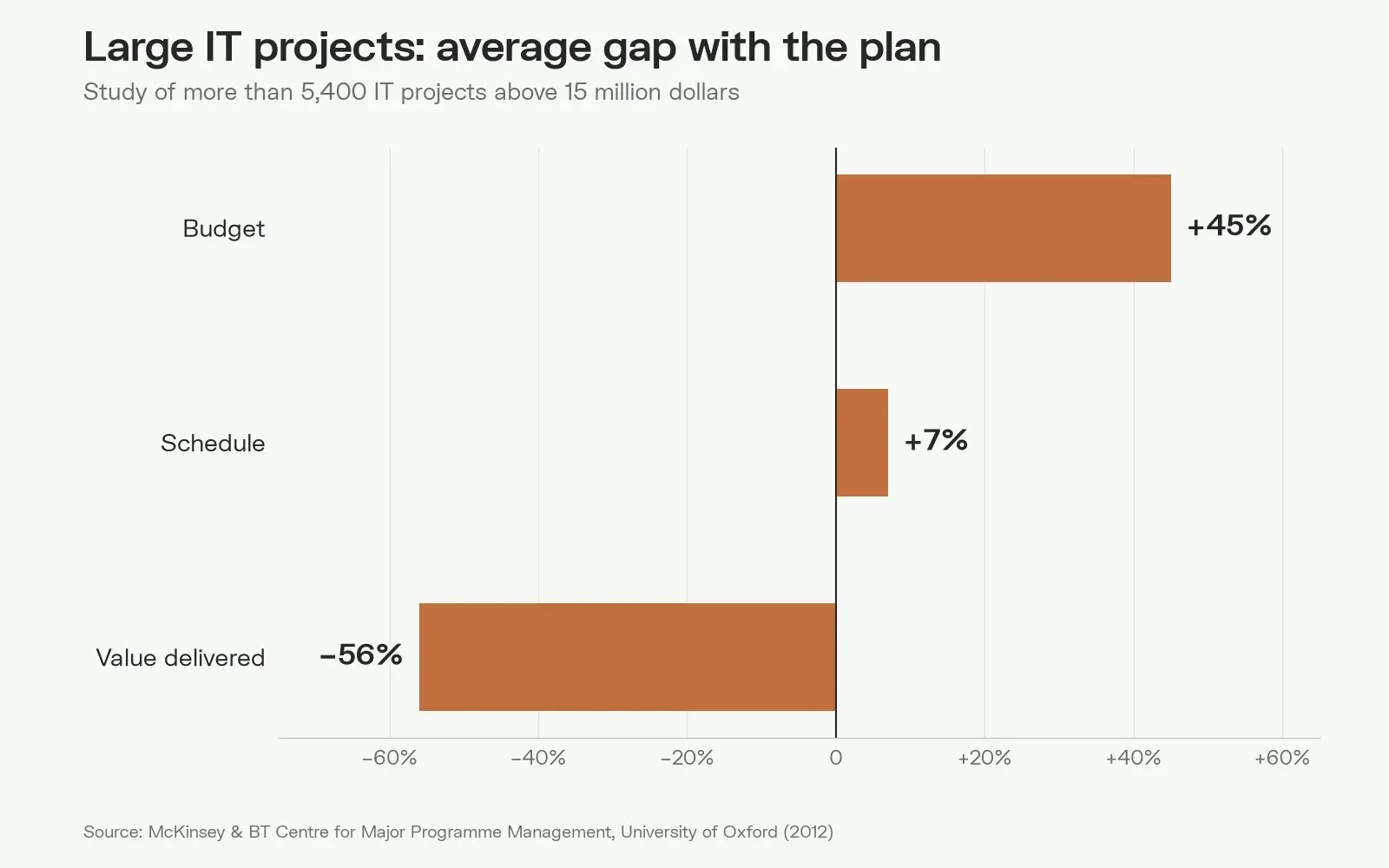
The third figure is the most telling. Schedules slip by only 7% because the delivery date is often kept… by dropping details. The software ships, but it does not do everything that was expected. The Pareto principle explains a large share of these failures, and it triggers others, more human ones:
- The quote covers the visible 80%. Screens and features get estimated, edge cases do not. The budget is sized for the first curve, not the second.
- The demo misleads everyone. When the client sees 80% of their software after a few weeks, they conclude the end is near. Sometimes the team does too.
- Real data arrives too late. Development happens with clean, made-up data, then thousands of exceptions surface during migration.
- The budget runs out before the end. Details emerge during acceptance testing, when there is no margin left. Without the means to finish, the software ships incomplete or the project stops.
- Fatigue sets in. After weeks stuck at "90%", the team wears out, and so does the client. Exchanges get tense, motivation drops, and the last details get rushed.
- The client disengages. The internal sponsor changes jobs, key users no longer have time to test, decisions drag on. With nobody to make the call, every detail becomes a requirement and the scope keeps growing.
- The developer disappears. A freelancer moves on to another client, an agency closes, an in-house developer resigns. Whoever knew the code leaves with part of the project, and their successor must first understand it before moving forward.
A specification will not protect you either
Faced with these risks, the reflex is to write everything down in a detailed functional specification. It remains useful, but it does not protect you. It mostly describes what the tool must do when everything goes well, rarely what it must do when something goes wrong. Above all, it is frozen at the very moment the project starts learning.
A custom project evolves along the way, and that is normal: users discover their real needs by using the first versions, a business rule changes, the market moves. This is inherent to custom software. Clinging to the original document produces software that is compliant but ill-suited, while dropping it without a framework produces a project that never ends. What you need is a clear framework and flexibility: a prioritised scope, and explicit trade-offs whenever a new need comes up.
Early savings become late debts
In custom software, what you save at the start is often paid back at the end, at an enormous interest rate. A tight quote, a cheaper developer, shortened scoping, tests postponed "for later": everything looks fine at first, the demo moves fast and the budget holds. Then the interest falls due at the worst possible moment, when the details have to be handled, and every shortcut makes every addition slower and riskier. That is how projects that start very well end badly, or never end at all.
How to account for the Pareto principle in a software project
Details are unavoidable. The goal is to surface them earlier and decide which ones deserve to be handled. In practice:
- List the details during scoping. The list above works as a checklist: for each family, ask what applies to the project. It is one of the topics of our article on the work that comes before the code.
- Deliver a complete end-to-end flow early. Rather than ten half-finished screens, a single flow that is truly production-ready, with its errors, permissions and real data. It reveals hidden details in the first weeks.
- Work with real data from the start. An export from the old system, even a partial one, beats demo data.
- Use Pareto the other way round. Typically, 20% of features cover 80% of usage. Better to handle that 20% perfectly than to skim over everything else: that is the idea behind a good MVP.
- Budget explicitly for the details. An honest estimate does not stop at the screens. It sets aside a significant share of the time for robustness, testing and data migration.
- Keep flexibility within a framework. A prioritised scope rather than a frozen list: when a new need arrives, it replaces another one or pushes the delivery back, and that decision is made explicitly.
- Do not depend on a single person. Readable code, standard technologies, up-to-date documentation and at least two people who know the project. The client remains the owner of its code.
- Keep both sides engaged. A client-side contact who is available, short and regular demos, decisions made in meetings rather than postponed.
- Measure progress in finished flows, not in screens. A screen on display can hide weeks of work, a flow tested with real data far less.
At KERN-IT, this is the approach we apply to our custom software development projects: scoping that lists edge cases before pricing, deliveries in complete flows, and a clear decision on what goes into the first version and what waits for the next.
There is also a more radical way to use the Pareto principle: not rebuilding the 80% that every company shares. Accounts and access rights, portals, invoicing, notifications, generated documents, history: our business platforms ship these building blocks already built and proven in production. The budget then goes into the 20% that makes the difference: your rules, your processes, your business.
Frequently asked questions
What is the Pareto principle in software development?
It is the observation that about 80% of an application gets built with 20% of the effort, while the remaining 20% (edge cases, error handling, permissions, real data, performance) takes 80% of the effort. It explains why a project looks almost finished long before it actually is.
Why is my software project stuck at 90%?
Because the last 10% is not the same kind of work as the first: the team no longer builds screens, it handles combinations of special cases, and every fix must be tested against the others. This is the ninety-ninety rule, coined by Tom Cargill and popularised in 1985 by Jon Bentley.
How do you estimate a software project without underestimating the details?
By listing edge cases during scoping, working with real data, delivering a complete end-to-end flow early and explicitly setting aside budget for robustness and testing. An estimate that only covers visible screens rarely accounts for more than half of the real work.
Does a detailed specification protect a software project?
Not entirely. A functional specification mostly describes normal operation and is frozen at the start, whereas a custom project always evolves along the way. The best protection combines a clear framework, a prioritised scope and explicit trade-offs whenever a new need appears.